An SEO-friendly URL is a web address that describes its page clearly and works consistently for visitors and search engines. For example, /services/roof-repair/ tells a reader more about the destination than /page?id=4827. The descriptive version is easier to recognize, share, and maintain.
A friendly URL supports a useful page. It does not guarantee indexing or rankings, and changing an established address simply to add a keyword can create unnecessary work. Choose sensible URLs before publication. For existing pages, first decide whether the benefit justifies a change and plan how old links will reach the replacement.
This guide explains URL parts, nine practical rules, examples for business websites, and a process for checking new or changed addresses. The examples are illustrative rather than live pages, and the recommendations apply to English-language websites beyond any single country.
What makes a URL SEO-friendly?
A URL should help someone recognize the page they are about to open. An address such as /blog/roof-repair-cost/ suggests a cost guide. /services/roof-repair/ suggests a service page. That difference is useful when someone sees a shared link or compares destinations on your website.
The address also needs to lead to the intended content. A readable slug is of little use when the page returns an error, requires a login unexpectedly, or redirects to an unrelated destination. Google's technical requirements cover basic eligibility: Googlebot must be able to access the page, the page must work, and it must contain indexable content. Meeting those requirements does not guarantee inclusion in search.
Keep URL work in proportion. If your address is already clear and stable, improving the page itself may be the more useful task. RankVigor's guide to thin content versus helpful content offers a related starting point for evaluating what the page actually answers.
Understand the parts before editing a URL
Consider this illustrative address:
https://example.com/blog/seo-friendly-url/
The scheme is https, the domain is example.com, and the path is /blog/seo-friendly-url/. The final named path segment, seo-friendly-url, is commonly called the slug. In many content management systems, editing a post's slug changes that part of the address rather than the domain or every site's URL setting.
An address can also contain a query string after ?, such as ?color=navy, or a fragment after #, such as #size-guide. MDN's explanation of URLs describes these components. Query parameters can provide information to the server. A fragment commonly identifies a position within the resource.
A section anchor can help a reader jump within a page. For distinct pages you want discovered separately, use actual page URLs. Google's URL guidance generally does not support fragments as a way to change page content for search.
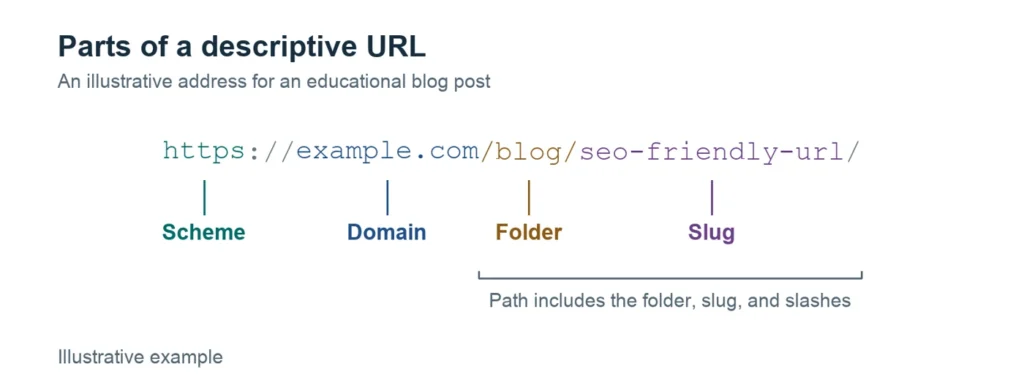
Changing a slug, a domain, or a site-wide permalink structure involves different scopes of work. Confirm which setting you are about to edit before saving it.
Nine rules for choosing a useful URL
These rules combine official platform guidance with practical editorial choices. They are a planning checklist, not a formula for a particular ranking position.
1. Describe the page accurately
Choose a slug that fits the page's main subject. A roof-repair service can use /services/roof-repair/; a guide to checking roof damage needs a different address, such as /blog/signs-of-roof-damage/.
Before choosing the words, finish this sentence: "This page helps the visitor understand or do..." The answer should match the page's content and purpose. A broad label such as /tips/ gives little context when the actual article covers a specific repair question.
2. Use the topic naturally
Include the main topic when it makes the address clearer. For this article, seo-friendly-url is enough to identify the subject. There is no need to fit every related query into /seo-friendly-url-friendly-url-url-seo-guide/.
Your slug does not need to reproduce a long page title word for word. A guide titled "How to Choose an SEO Agency Before You Hire" could use /blog/how-to-choose-an-seo-agency/. Keep the page title descriptive for the reader and choose an address you can continue using if the headline improves later.
3. Separate words with hyphens
For a new English slug, use roof-repair-cost rather than roof_repair_cost or roofrepaircost. Google's URL-structure guidance recommends hyphens as word separators and readable words where possible.
Do not turn this into an automatic rewrite of every published underscore URL. A naming convention for new pages and a decision to migrate established pages are separate tasks. Review the existing page and its links before changing an address that already works.
4. Keep letter case consistent
Lowercase is a practical default for new English paths: /services/office-cleaning/ is easier to reproduce consistently than a mixture of /Services/Office-Cleaning/ and /services/office-cleaning/.
The URI standard distinguishes case-insensitive schemes and hosts from other components that are generally case-sensitive. Ask your developer how the site's server handles path case. Do not assume a lowercase and uppercase address always lead to the same page or can be changed without a redirect plan.
5. Remove filler while keeping the meaning
Compare /blog/everything-you-need-to-know-about-the-cost-of-roof-repair/ with /blog/roof-repair-cost/. The second preserves the subject with less text to read or mistype.
Treat brevity as an editorial choice, not a fixed character target. Do not shorten /blog/how-to-hire-an-seo-agency/ to /blog/hire/, which removes the useful distinction. Small words can also preserve meaning: /blog/how-to-delete-a-profile/ is understandable without mechanically removing every word such as "to" or "a."
6. Choose an address that can stay useful
For an evergreen guide, an address such as /blog/roof-maintenance-checklist/ can remain useful through routine updates. Adding a new year to the slug every time you revise the article would create repeated URL changes.
Dates and numbers are appropriate when they identify the actual content. An annual report can reasonably include its reporting year; a product's model number may be essential. Choose between an evergreen page and a distinct dated publication based on the content you intend to maintain. Do not remove meaningful identifiers just to make an address look shorter.
7. Use a structure your site can maintain
A business might organize service pages under /services/ and guides under /blog/. A shop may need product and category paths supported by its platform. Use a convention that fits the website and helps the team put new pages in the right place.
Google's SEO Starter Guide discusses logical organization and descriptive URLs. A folder count alone does not establish the usefulness of your structure. Review navigation and internal links too. A short path can still be hard to find when no relevant page links to it.
Avoid rebuilding a working hierarchy just to remove a folder. A site-wide change affects more addresses than editing one draft slug and needs a broader plan.
8. Keep parameters only where they serve a purpose
The ? in a URL is not automatically an SEO problem. /products/work-jacket/?color=navy may identify a useful product variant. Campaign parameters can record where a visitor came from. Understand what a parameter does before removing it or changing how the site responds.
Google's ecommerce URL guidance addresses query parameters, product variants, and avoiding temporary values in internal links. For ordinary navigation, link to the stable destination rather than adding session identifiers or campaign tracking to every internal link.
Ask your developer which parameter versions change the content and which duplicate it. Do not automatically point all filtered or paginated pages to one category URL. Different destinations may contain different useful content and require different indexing decisions.
9. Agree on the preferred version
Confirm the site's intended HTTPS address, hostname, path case, and trailing-slash convention. /services/roof-repair and /services/roof-repair/ should not be treated as interchangeable without checking the site's behavior.
For duplicate or very similar pages, Google's canonicalization guidance explains how redirects, canonical annotations, and sitemaps communicate a preferred version. A canonical is a signal rather than a guarantee of Google's selection. It also does not move a visitor to another address as a redirect does.
Use the intended URL consistently in internal links and the sitemap. Have the developer check that canonical output agrees with it. A CMS or SEO plugin may already generate the annotation; inspect that output before adding another copy.
Examples for common business pages
The following examples use paths rather than live links. They illustrate choices for new pages, not instructions to rename existing URLs without checking them.
| Page purpose | Illustrative path | What the wording clarifies |
|---|---|---|
| Roof-repair service | /services/roof-repair/ | The service being offered |
| Move-out cleaning service | /services/move-out-cleaning/ | A specific cleaning need |
| Local service page | /locations/austin/roof-repair/ | The location and service if both are genuinely relevant |
| Agency hiring guide | /blog/how-to-choose-an-seo-agency/ | An informational hiring question |
| Annual report | /reports/2026-service-report/ | The report's actual year |
| Product variant | /products/work-jacket/?color=navy | A parameter with a possible functional purpose |
The local example is appropriate only when the page accurately serves that location and has useful information for its visitors. A clear address cannot make a fabricated branch or a generic city page credible.
These conventions can coexist. You do not need to make service pages, reports, and products use the same type of slug when their purposes differ.
Before and after: unclear and clear URLs
These pairs use the examples from the rules above. Apply them when naming new pages; for a page that already works, plan the change and its redirect first.
| Unclear URL | Clearer URL | What changed |
|---|---|---|
/page?id=4827 | /services/roof-repair/ | Readable words describe the page |
/blog/roof_repair_cost/ | /blog/roof-repair-cost/ | Hyphens separate the words |
/Services/Office-Cleaning/ | /services/office-cleaning/ | Consistent lowercase path |
/blog/everything-you-need-to-know-about-the-cost-of-roof-repair/ | /blog/roof-repair-cost/ | Filler removed, meaning kept |
/seo-friendly-url-friendly-url-url-seo-guide/ | /blog/seo-friendly-url/ | Topic used once, not repeated |
/blog/hire/ | /blog/how-to-hire-an-seo-agency/ | Enough words to stay specific |
Set the slug before publishing a new page
Start with the page's purpose and the site's existing convention. Draft a descriptive slug, then check the complete preview URL. Make sure it does not collide with another page and that the CMS has not added an unexpected suffix or folder.
In WordPress, site-wide permalink settings and an individual post's slug are different controls. WordPress's permalink documentation explains the available structures. Choosing a structure for a new site is different from changing the structure of an established one. Do not switch a live site's global setting simply to improve one article's address.
Use your CMS's current editor controls to confirm the draft's slug. If the platform imposes a product or blog prefix, work within that structure unless there is a meaningful reason and a supported process to change it. Check the final live URL after publication rather than relying only on the text in the editor.
Plan an existing URL change before saving it
Changing an existing address deserves more care than naming a draft. Review whether the page receives search clicks, has important links pointing to it, appears in navigation, or is used in campaigns and customer messages. Record the current address and what problem the change would solve.
An address such as /blog/roof_repair_cost/ may already lead visitors to a useful page. Replacing underscores alone may be a lower priority than fixing a broken quote form or an inaccessible service page. Make the decision based on the actual issue, not a desire to apply every naming preference retrospectively.

When a move is justified, coordinate these steps with whoever manages the website:
- Record each old address and its relevant replacement, along with the reason for the change.
- Prepare the replacement page and a recovery plan. At launch, the final address should serve the intended content with an HTTP
200response. Remove development-only crawl blocks ornoindexinstructions from a page intended for search, and confirm its canonical points to the intended new address before directing old links to it. - Set a direct permanent server-side redirect for a genuine permanent move. Google's redirect documentation identifies 301 and 308 as permanent status codes.
- Update your own navigation and contextual links to use the final address, and align the sitemap and canonical output.
- Test that the old address returns the intended permanent redirect directly to the final destination, with no loop or unnecessary chain. Confirm the final response and content, then review search indexing and actual visitor journeys after launch.
The redirect target should be the corresponding replacement, not a generic destination selected only because it exists. Google's site-move guidance warns against sending many unrelated old URLs to the homepage. It recommends retaining redirects as long as possible, generally at least a year; old customer links may justify keeping them longer.
If a page is retired without a relevant replacement, discuss returning an appropriate 404 or 410 response rather than redirecting everything to a homepage. Google's HTTP status documentation explains how those responses are handled. This is different from a useful page moving to a new address.
A broad restructuring or domain move needs a wider inventory and rollout plan. Do not treat a short slug-edit checklist as a complete migration procedure.
Check the result rather than just the spelling
Open the final URL on a phone and desktop. Confirm that the expected page loads, the content matches the address, and its navigation and contact actions work. Test old addresses when redirects are involved. A browser showing the page is helpful, but it does not by itself confirm the response code or canonical output.
Ask the developer to verify the redirect destination, final HTTP response, and intended canonical, and check for unintended noindex instructions or crawl blocks. Check that important internal links are ordinary crawlable links. Google's link guidance explains the use of anchor elements with an href for reliable discovery.
In the correct verified Search Console property, inspect the complete final URL with URL Inspection. Review the indexing explanation and the Google-selected canonical in the indexed data where available. Investigate an unexpected selection. The live test checks current access; it does not establish indexing or predict canonical selection. It also follows redirects without displaying the final tested URL, so use a separate HTTP check to validate the redirect route.
Keep a simple record of the old address, new address, launch date, responsible person, test findings, and follow-up. For existing pages, compare relevant search and business outcomes over meaningful periods. A URL change can coincide with other changes, so do not assume it caused every increase or decline.
Frequently asked questions
What is an SEO-friendly URL?
It is a descriptive, usable web address supported by a consistent technical setup. A visitor can recognize the page's subject, and the address leads to the intended content. A readable slug alone does not guarantee that search engines will index or rank the page.
What is the difference between a URL and a slug?
The URL is the complete address. The slug commonly refers to the final named path segment. In https://example.com/blog/roof-repair-cost/, the slug is roof-repair-cost. Changing it can change the page address without changing the domain.
How long should an SEO-friendly URL be?
Choose the length needed to describe the page clearly. Use a concise slug and preserve useful meaning rather than chasing a particular SEO character count. The complete URL also includes the scheme, domain, folders, and any necessary parameters, so a single slug-length rule cannot describe every valid address.
Are URLs with parameters bad for SEO?
No. Parameters may support product variants, pagination, or tracking. Problems can arise when a site creates many unnecessary or duplicate versions. Review what the parameter changes and how the site handles discovery and canonicalization rather than deleting every query string.
Should I change a URL when I update the title?
Usually, a headline improvement does not require an address change when the page's subject stays the same. Keep an existing descriptive URL where it remains suitable. If the page moves, prepare the relevant redirect and update links and technical references before launching the change.
Does an SEO-friendly URL guarantee better rankings?
No. Readable, consistent addresses help people understand and use a website, but they do not replace useful content or sound technical access. Evaluate URL changes alongside the page's actual purpose and performance rather than promising a ranking increase from a slug edit.
Choose clear addresses and keep existing links working
For your next new page, choose a descriptive slug and confirm it fits the site's convention. For an existing page, first establish why its address needs to change. When a move is necessary, test the replacement and preserve a clear route from old links.
If you need help assessing URL duplication, redirects, or indexing issues, explore RankVigor's technical SEO services or request a free SEO audit.